

TL;DR
Live chat for law firms helps turn a high-intent website visit into a consultation request before the visitor leaves, calls another attorney, or forgets the details of their legal issue. For solo attorneys and small practices, the best setup is a lightweight legal website chat widget that captures the visitor’s name, contact method, practice area, urgency, and preferred consultation time.
Use chat to:
- Respond quickly to people actively comparing attorneys.
- Collect structured intake details without a long form.
- Route urgent issues, qualified consultations, and general questions differently.
- Avoid giving legal advice before conflict checks, engagement letters, or attorney review.
Knocket is a 100% free forever contact tool with no ads and no seat limits. A law firm can add a website widget with one script, publish a no-code Contact Page, and receive messages in a unified inbox with Telegram and email notifications.
Why Law Firm Websites Need Fast Visitor Response
A law firm website visitor is often in a narrow decision window. They may be dealing with an arrest, injury, employment dispute, contract deadline, divorce question, immigration filing, or business issue. If they cannot quickly ask, “Can you help with this?” they may call another firm, submit a form and wait, or leave without contacting anyone.
That is why live chat for law firms matters: it reduces the delay between intent and conversation.
Speed is not just a sales preference. Harvard Business Review’s study, “The Short Life of Online Sales Leads,” found that companies responding within an hour were significantly more likely to qualify leads than those responding later. Legal intake is not identical to B2B sales, but the behavioral point is relevant: attention decays quickly after the search moment. Source: Harvard Business Review.
| Page type | Visitor intent | Best chat goal |
|---|---|---|
| Personal injury page | “Do I have a case?” | Capture incident type, date, location, injury severity |
| Criminal defense page | “Can I speak to someone now?” | Identify charge, court date, urgency, safe contact method |
| Family law page | “What are my options?” | Ask issue type, county, consultation preference |
| Immigration page | “What filing or deadline applies?” | Capture status, deadline, case type, language preference |
| Business law page | “Can you review or draft this?” | Capture document type, timeline, company role |
The mistake is assuming every visitor wants to call. Many do not. Some are at work, sharing a home, sitting in a courthouse, or researching after hours. Attorney website messaging gives them a lower-friction way to raise their hand.
A lightweight Knocket live chat widget can sit on the website, let the visitor start a conversation, and notify the team without forcing the firm to adopt a CRM.
How Real-Time Chat Supports Client Intake and Consultation Requests
Client intake chat works best when it does not try to replace the attorney. Its job is to collect enough information to decide the next step.
A practical consultation request chat should capture six things:
- Name
- Preferred contact method
- Practice area
- Basic issue summary
- Urgency or deadline
- Permission to follow up
That is enough for a first triage step. It is not enough to give legal advice, decide conflicts, or promise representation.
| Intake question | Why it matters |
|---|---|
| “What type of legal issue are you dealing with?” | Routes the inquiry to the right practice area |
| “Is there a court date, filing deadline, or hearing scheduled?” | Detects urgency |
| “What city, county, or state is this connected to?” | Helps jurisdiction and office routing |
| “How would you prefer we contact you?” | Reduces missed follow-up |
| “Please avoid sharing highly sensitive details until an attorney reviews your inquiry.” | Sets safe boundaries |
This is where chat beats a static contact form. Forms feel like paperwork. Chat feels like a first conversation. The visitor can ask a specific question, and the firm can respond with a safe next step: “Thanks. We can’t provide legal advice here, but we can schedule a consultation to review the details.”
Knocket supports this lightweight workflow with three contact surfaces:
- Website live chat widget for visitors on practice area pages.
- No-code Contact Page for bios, Google Business Profile links, email signatures, and QR codes.
- Unified Inbox for conversations from website, Contact Page, Telegram, and email.
You can create a no-code consultation link with Knocket Contact Page publishing and use that link anywhere a potential client may discover the firm.
Important Compliance and Privacy Considerations for Legal Chat
Legal chat is not ordinary website messaging. A law firm must treat it as a controlled intake channel, not a casual support box.
The key issue is that chat can create confusion about confidentiality, attorney-client privilege, legal advice, and whether the firm has agreed to represent the person. The American Bar Association’s Model Rule 1.6 covers confidentiality of information, while Model Rule 7.1 addresses truthful communications about legal services. Firms should also review their own state bar rules.
Use these guardrails in your legal website chat widget:
| Risk | Practical safeguard |
|---|---|
| Visitor assumes representation started | Add a short disclaimer before collecting details |
| Visitor shares sensitive facts too early | Ask for a summary, not confidential documents or full evidence |
| Conflict check needed | Do not promise advice or representation in chat |
| Urgent deadlines | Tell visitors to call emergency numbers or court resources when appropriate |
| Data privacy | Limit intake fields to what the firm actually needs |
| Advertising rules | Avoid guarantees like “we will win” or “you have a case” |
A safe opening note might say:
“Please do not send confidential details until an attorney confirms we can review your matter. This chat helps us understand your request and arrange follow-up.”
The ABA’s Formal Opinion 477R also discusses lawyers’ duties around electronic communications. For privacy and consumer data handling, firms should review applicable rules such as the FTC’s guidance on privacy and security.
Knocket is a contact layer, not a compliance engine. It helps you receive and reply to inquiries, but your firm must configure prompts, disclaimers, retention practices, and review workflows according to the rules that apply to your jurisdiction and practice.
How Knocket Helps Law Firms Capture and Qualify Leads
Knocket is useful for small law firms because it focuses on the narrow job that matters early: make it easy for a visitor to contact a real person.
It is not a CRM. It is not an AI customer-service system. It is not an Intercom replacement. For a solo attorney, boutique practice, or new firm trying to capture more qualified consultations, that is a feature, not a limitation.
Knocket gives you:
- One-line website chat installation.
- A shareable Contact Page.
- A unified inbox for live chat and connected channels.
- Telegram and email notifications.
- Direct replies from the inbox.
- 100% free forever pricing, with no ads and no seat limits.
The website installation is intentionally small:
<!-- Paste before </head> or </body>.
Replace YOUR_ID with the identifier from the Knocket console. -->
<script
  src="https://trtc.io/knocket-sdk/sdk.js?identifier=YOUR_ID"
  async>
</script>
Get the full script from the Knocket installation console. The async attribute helps avoid blocking page rendering, and you do not need npm, a build step, or a developer-heavy rollout.
| Channel | Where to use it | What it captures |
|---|---|---|
| Web Widget | Practice area pages, homepage, blog posts | Live questions from active visitors |
| Contact Page | Attorney bio, email signature, QR code, social profile | Consultation requests without a website form |
| Unified Inbox | Daily intake review | All conversations in one place |
| Telegram/email notification | After-hours or mobile response | Fast awareness of new inquiries |
You can manage replies through the Knocket console inbox and keep messages from the website, Contact Page, Telegram, and email from fragmenting across tools.
Best Chat Prompts for Practice Area and Contact Pages
The best prompts are specific enough to move the inquiry forward, but careful enough not to solicit sensitive facts too early.
Avoid vague prompts like:
- “How can we help?”
- “Ask us anything.”
- “Do you have a case?”
Use prompts that match the page context.
| Page | Better prompt |
|---|---|
| Personal injury | “Were you injured in an accident? Tell us the date, location, and best way to contact you.” |
| Criminal defense | “Do you have a court date or urgent charge question? Share the charge type and preferred contact method.” |
| Family law | “Need help with divorce, custody, or support? Tell us the issue type and county.” |
| Immigration | “Have an immigration deadline or filing question? Share the case type and preferred language.” |
| Estate planning | “Need a will, trust, or probate consultation? Tell us what you are trying to prepare or resolve.” |
| Business law | “Need contract, formation, or dispute help? Share the document or issue type and timeline.” |
| Contact page | “Send a brief consultation request. Please avoid confidential details until we confirm review.” |
A useful Knocket configuration for a law firm might include:
- Welcome message: “Hi, this is the intake channel for consultation requests.”
- Offline message: “Thanks for reaching out. Leave your contact details and we’ll follow up during business hours.”
- Language setting: Match the firm’s primary client language.
- Avatar: Attorney headshot or firm mark.
- Contact Page links: Website, phone, email, office location, professional profiles.
If you want a simple link for attorney bios, newsletters, or ads, publish a Knocket Contact Page for consultation requests instead of sending every visitor to a long form.
Example Conversation Flows for Legal Inquiries
A strong legal chat flow is short. It should collect routing data and schedule the next step, not turn into a legal analysis session.
Flow 1: Personal Injury Inquiry
Visitor: “I was in a car accident last week. Can you help?”
Firm: “I’m sorry that happened. We can help route your request. What city or county did the accident happen in?”
Visitor: “Orange County.”
Firm: “Thanks. Were you injured, and have you already spoken with an insurance adjuster?”
Visitor: “Yes, neck injury. They called yesterday.”
Firm: “Understood. Please avoid sharing confidential details here. What phone number or email should we use to schedule a consultation?”
Why this works: it identifies location, injury, and insurance contact without evaluating liability or promising a result.
Flow 2: Criminal Defense Inquiry
Visitor: “I got charged with DUI and have court next week.”
Firm: “Thanks for reaching out. Is the court date within the next 7 days?”
Visitor: “Yes, Monday.”
Firm: “That sounds time-sensitive. Please share your preferred callback number and the county where the case is filed. We’ll flag this as urgent for attorney review.”
Why this works: it routes urgency immediately and avoids advice about what to say or do.
Flow 3: Business Contract Inquiry
Visitor: “Can someone review an independent contractor agreement?”
Firm: “Yes, we can collect the request. What is your timeline for review?”
Visitor: “Before Friday.”
Firm: “Thanks. Are you the company, the contractor, or another party to the agreement?”
Visitor: “The company.”
Firm: “Got it. Please share your email and preferred consultation time. Don’t upload or paste confidential contract terms until the firm confirms next steps.”
Why this works: it qualifies role, timeline, and need while controlling document sharing.
Knocket’s value is keeping the path open: visitor starts chat, the firm gets notified, and the response goes back to the visitor through the original channel.
How to Route Urgent, Qualified, and General Questions
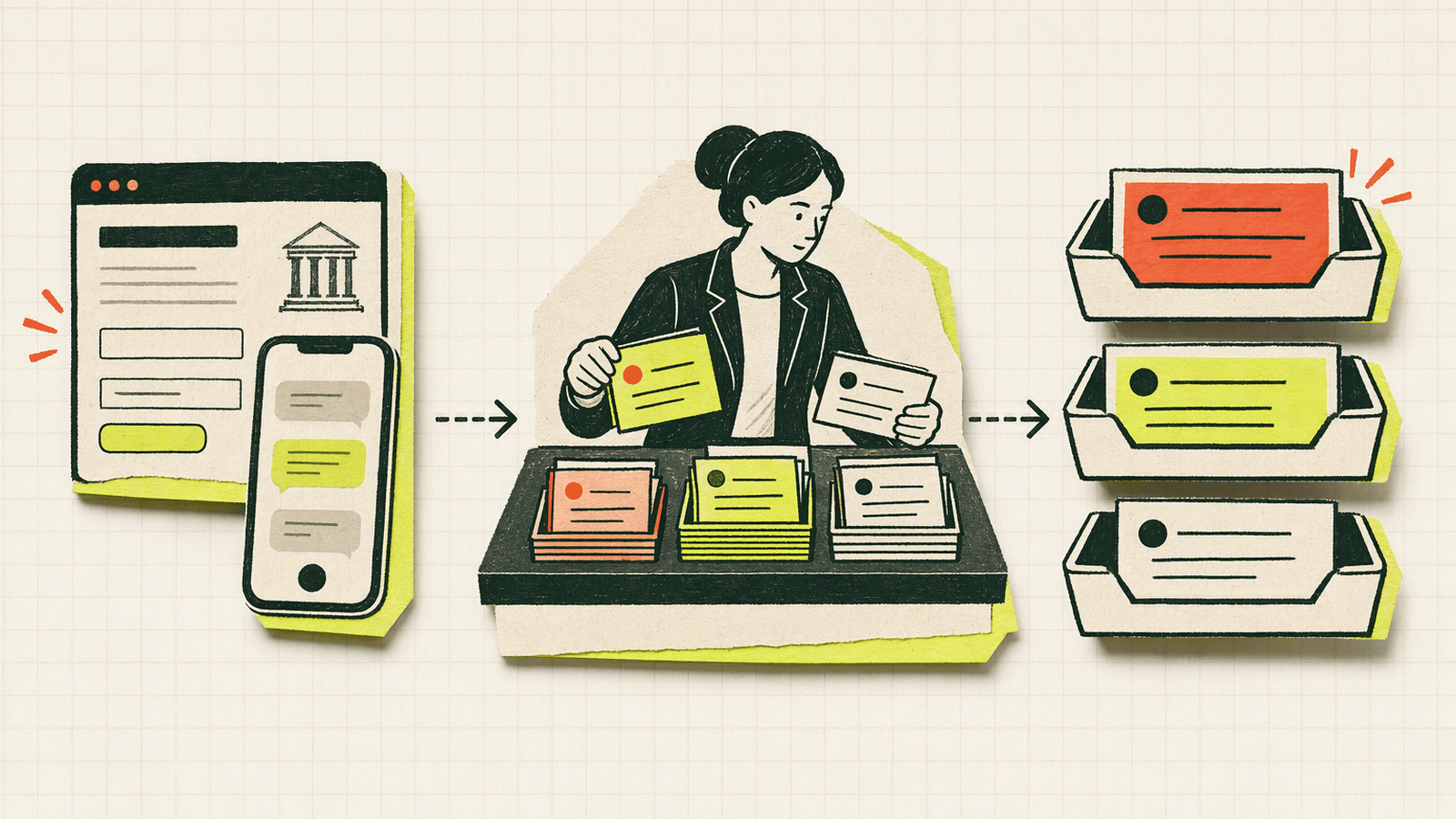
Not every chat deserves the same response path. Build a simple routing policy before you install any tool.
| Category | Signals | Response target | Suggested action |
|---|---|---|---|
| Urgent | Court date, arrest, deadline, injury, active hearing | Same day or immediate if staffed | Ask for phone, county, deadline; notify attorney |
| Qualified consultation | Practice-area fit, jurisdiction fit, can pay or fits firm model | Same business day | Offer consultation times |
| General question | Broad research, no location, unclear issue | 1 business day | Send safe next step or resource |
| Not a fit | Wrong jurisdiction, unsupported matter, conflict concern | As soon as practical | Decline carefully or suggest appropriate resource type |
| Existing client | Mentions active matter or attorney name | Internal review | Move to existing client communication policy |
Knocket can support this with channel habits:
- Use Telegram notifications for urgent new live chat messages.
- Keep email notifications on for audit-friendly awareness.
- Review the unified inbox at set times each day.
- Use the Contact Page for after-hours requests and non-website traffic.
A small firm does not need complex automation to start. A written rule like “court date within 7 days gets attorney notification” is often enough.
For channel setup, start from the Knocket website and Contact Page workflow, then connect notifications so new inquiries do not sit unseen.
Metrics Law Firms Should Track from Chat Conversations
A legal chat widget should be judged by consultation quality, not message volume alone.
Track these practical metrics:
| Metric | Why it matters |
|---|---|
| Chat starts by page | Shows which practice pages generate intent |
| Consultation requests | Measures real lead capture, not casual browsing |
| Response time | Shows whether the firm is fast enough to keep attention |
| Qualified inquiry rate | Separates good-fit matters from general questions |
| Scheduled consultations | Connects chat to business outcome |
| No-response follow-ups | Reveals missed calls or bad contact details |
| Urgent inquiries | Helps staffing and notification rules |
| After-hours inquiries | Shows whether Contact Page and offline messages matter |
For the first month, a spreadsheet is enough: date, source page, practice area, urgency, contact method, qualification status, consultation outcome, and notes.
The Clio Legal Trends Report regularly analyzes legal consumer behavior and law firm operations. Use reports like that for context, then validate against your own chat transcripts and consultation outcomes.
Law Firm Chat Implementation Checklist
Use this checklist before adding live chat to a law firm website.
1. Define the chat’s job
Pick one primary goal:
- Schedule consultations.
- Capture after-hours inquiries.
- Route urgent matters.
- Replace a long contact form.
- Support a specific campaign or practice area.
If the goal is “answer every legal question instantly,” stop. That creates risk and unrealistic expectations.
2. Write a safe welcome message
Example:
“Tell us what type of legal issue you need help with and how to contact you. Please avoid confidential details until an attorney confirms review.”
3. Decide what information to collect
Minimum recommended fields:
- Name
- Email or phone
- Practice area
- Location or county
- Deadline or court date
- Preferred consultation time
4. Create routing rules
Examples:
- Court date within 7 days: urgent.
- Wrong state or jurisdiction: not a fit.
- Existing client: move to attorney-approved communication path.
- New consultation request: intake review.
5. Install the widget
Add the Knocket script before </head> or </body>, or ask your website manager to add it.
Supported website builders include WordPress, Shopify, Webflow, Framer, Carrd, Ghost, Wix, Squarespace, Next.js, Astro, Nuxt, and other sites that allow custom code. Use the official Knocket installation page to copy your identifier-specific script.
6. Publish a Contact Page
Use the Contact Page for:
- Attorney email signatures.
- Google Business Profile website link.
- Social media bio.
- Printed QR codes.
- Referral partner links.
- Event handouts.
Create it through Knocket’s no-code Contact Page console.
7. Turn on notifications
Enable Telegram and email notifications so live inquiries do not wait for someone to manually check the website. If you use Telegram, Knocket can notify you of live chat messages and support reply flows without requiring you to keep the console open.
8. Review compliance language
Ask the responsible attorney to review:
- Welcome message.
- Offline message.
- Disclaimer language.
- Intake questions.
- Data handling policy.
- State bar advertising requirements.
9. Test the full path
Before publishing, test as a visitor:
- Open the site in a private browser window.
- Send a consultation request.
- Confirm the notification arrives.
- Reply from the inbox or notification flow.
- Confirm the visitor sees the response.
- Record any confusing wording.
10. Review conversations weekly
For the first 30 days, review patterns:
- Which pages start chats?
- Which prompts produce qualified consultation requests?
- Which questions create risk or confusion?
- Which matters should be routed faster?
- Which practice pages need clearer copy?
That weekly review is where law firm lead capture improves. The widget collects the signal; the firm improves the intake path.
FAQ
Is live chat for law firms allowed?
Often yes, but it must be configured carefully. Law firms should review state bar rules, confidentiality duties, advertising rules, and electronic communication guidance. Chat should not imply representation, guarantee outcomes, or provide legal advice before attorney review.
Can a legal website chat widget replace a contact form?
It can replace or supplement a contact form for many consultation requests. Chat is better for quick qualification and visitor engagement. A form may still be useful for structured intake after the firm confirms the matter is appropriate to review.
Should attorneys answer chat messages personally?
Not always. A staff member can collect basic intake details if trained on what not to say. Attorney review is important before giving legal advice, evaluating claims, or discussing strategy.
What should a law firm ask in client intake chat?
Ask for name, contact method, practice area, location, urgency, and a brief issue summary. Avoid asking visitors to paste confidential facts, documents, evidence, or detailed legal strategy into the first chat.
How fast should a law firm respond to consultation request chat?
Urgent matters should be flagged immediately if the firm is available. Qualified consultation requests should usually be answered the same business day. The exact standard depends on practice area, staffing, and risk.
Does Knocket provide AI legal answers?
No. Knocket is a lightweight contact tool for real conversations. It is not an AI legal assistant, CRM, or legal advice system. It helps firms capture inquiries, receive notifications, and reply through a unified inbox.
Is Knocket free for law firms?
Yes. Knocket is 100% free forever, with no ads and no seat limits. A firm can use the website widget, Contact Page, unified inbox, and supported notifications without adopting a paid tier.
For solo attorneys and small firms that want faster consultation capture without a heavy system, try Knocket at https://knocket.trtc.io/.