

TL;DR: Crisp pricing and plans vs Knocket
If you are comparing Crisp pricing and plans before adding live chat to an early product, the real question is not “Which platform has the longest feature list?” It is “What is the smallest reliable way to let interested users contact me today?”
For indie founders, Knocket is usually the simpler choice when you need a lightweight contact layer: a website live chat widget, a no-code Contact Page, Telegram/email notifications, and one unified inbox. Knocket is 100% free forever, with no ads and no seat limits.
Crisp may be a better fit if you specifically want a broader multi-feature messaging platform and are ready to evaluate paid-plan differences, team workflows, and advanced messaging features on Crisp’s official pages. This article does not claim current Crisp prices or limits were independently verified, because competitor research for this draft is degraded.
Information status: checked on August 14, 2026. Competitor research status is degraded, so pricing, plan names, limits, seats, branding, and feature gates should be verified directly on each provider’s official site before buying.
Official pages to verify:
Why founders compare Crisp pricing before choosing a live chat tool

Founders usually compare Crisp pricing because live chat looks cheap at first, then becomes operationally expensive when you add seats, branding removal, routing, automations, integrations, or higher usage limits.
That matters when you are still trying to reach your first 100 users. At that stage, the job is not to build a large support operation. The job is to make sure a curious visitor, beta user, GitHub reader, or potential customer can reach the founder without friction.
A practical pricing comparison should ask:
| Question | Why it matters for early founders |
|---|---|
| Can I install it in one sitting? | You should not lose a day configuring a contact channel. |
| Can users contact me without creating an account? | Early conversations often start from anonymous visitors. |
| Can I receive alerts where I already work? | Telegram and email notifications reduce missed messages. |
| Do I need a website? | Many indie projects start from a social profile, README, waitlist, or demo link. |
| Does the tool charge per seat? | Co-founders and collaborators should not create a pricing surprise. |
| Am I buying features I will not use yet? | Early teams often need conversations, not a full suite. |
Knocket is designed around this narrower early-stage need. You can start from the Knocket homepage, publish a contact surface, and route messages into one inbox without turning the tool into a CRM or enterprise helpdesk.
Crisp pricing overview: plan structure, team usage, and feature differences
Because current Crisp pricing was not independently verified for this article, do not treat any third-party summary as final. Use Crisp’s official pricing page as the source of truth for current plan names, price points, limits, and feature availability.
When reviewing Crisp pricing, founders should look beyond the monthly number and check the operational details:
- Plan structure: Which features are available at each level? Are the features you need included in the entry-level option, or are they gated behind higher tiers?
- Team usage: Does pricing change as you add teammates, contractors, or co-founders?
- Branding: Is removal of vendor branding included, paid, or unavailable at the level you want?
- Messaging channels: Which channels are supported on the plan you are considering?
- Inbox features: Which collaboration, assignment, and workflow features are included?
- Automation features: If you do not need automation yet, are you paying for complexity you will not use?
- Maintenance cost: Will setup require ongoing configuration, templates, routing rules, or team process?
This same discipline applies when you compare tidio pricing, tawk.to pricing, LiveChat, Intercom, or Zendesk. A pricing page is not just a price table. It is a map of what the vendor believes you should eventually buy.
For a solo founder, that may be too much too soon.
Knocket pricing: free forever for lightweight customer contact
Knocket has a different pricing premise: it is 100% free forever, with no ads and no seat limits.
That does not mean Knocket is trying to be a cheaper clone of a large messaging suite. It is intentionally smaller. Knocket is a lightweight contact tool for indie developers, solo founders, and early teams who need to catch every serious inbound message.
Core Knocket capabilities include:
- Web Widget: add live chat to a website with one async script.
- Contact Page: publish a shareable contact link with live chat and social links.
- Unified Inbox: manage messages from website/app/page live chat plus Telegram and email in one place.
- Telegram and email notifications: get notified outside the console.
- Telegram reply forwarding: reply from Telegram and send the answer back to the live chat visitor.
- Mobile Widget via WebView: embed a Knocket page inside iOS, Android, Flutter, or React Native apps.
- Open-source AI Agent: available separately for founders who want to experiment with AI-assisted replies, without changing Knocket’s core positioning as a lightweight contact tool.
For a website, installation is intentionally boring:
<!-- Paste before </head> or </body>. Replace YOUR_ID from the Knocket console. -->
<script
  src="https://trtc.io/knocket-sdk/sdk.js?identifier=YOUR_ID"
  async>
</script>
Get the exact snippet from the Knocket Web Widget installation page after creating your widget. The script is async, so it does not block page rendering, and it does not require npm or a build step.
If you do not have a website yet, publish a no-code Knocket Contact Page and put the link in your social bio, GitHub README, email signature, launch post, QR code, or waitlist page.
Feature comparison: Crisp inbox and website chat vs Knocket widget, contact page, and unified inbox
Crisp and Knocket overlap on one obvious surface: website chat. The difference is what each product optimizes for.
Crisp is commonly evaluated as a broader customer messaging platform. If you are considering it, you should inspect its official product and pricing pages for inbox workflows, website messenger capabilities, integrations, automation, and plan-specific availability.
Knocket optimizes for the smaller early-founder loop:
- Visitor wants to ask a question.
- Visitor opens the widget or Contact Page.
- Founder receives a notification in the inbox, Telegram, or email.
- Founder replies.
- The reply goes back to the original contact channel.
| Capability | Crisp | Knocket |
|---|---|---|
| Website chat | Verify current details on Crisp’s official pages | One-line async Web Widget |
| Shareable contact link | Verify current details on Crisp’s official pages | Built-in no-code Contact Page |
| Unified inbox | Verify plan-specific details | Website/App/Page live chat + Telegram + email in one inbox |
| Telegram notifications | Verify current integration details | Supported, with reply forwarding for live chat messages |
| Email notifications | Verify current integration details | Supported |
| Mobile app contact entry | Verify current mobile options | Mobile Widget embedded via WebView |
| Pricing model | Verify current Crisp pricing and plans | 100% free forever, no ads, no seat limits |
| Best early use case | Teams wanting a broader messaging platform | Founders who need a fast, lightweight contact layer |
This is also why Knocket belongs in searches for livechat alternatives, intercom alternatives, zendesk alternatives, and free zendesk alternatives only for the early-stage contact use case. It is not a Zendesk replacement. It is not an Intercom replacement. It is a simpler way to be reachable before you need those heavier systems.
Contact Page vs traditional chat widget: why shareable contact links matter for indie founders
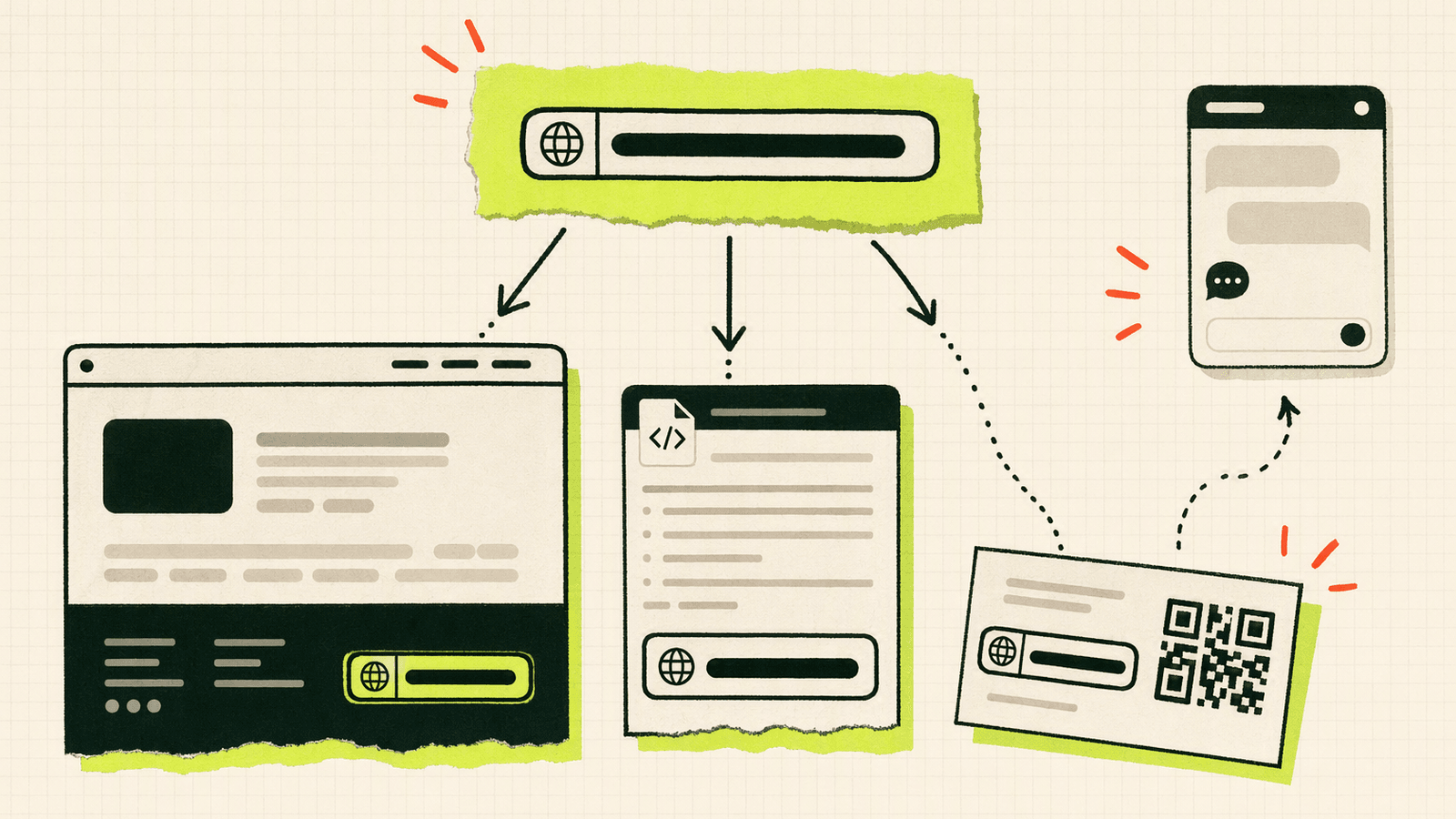
A traditional chat widget assumes you already have traffic landing on a website. Many early founders do not.
Your first useful conversations may come from:
- a Product Hunt teaser;
- a GitHub README;
- a Twitter/X or LinkedIn bio;
- a Discord community post;
- a newsletter sponsorship;
- a cold email signature;
- a QR code at a meetup;
- a Carrd landing page;
- a Notion public page;
- a demo video description.
A widget cannot help if the user is not on your site. A shareable contact link can.
Knocket’s Contact Page is no-code. You configure avatar, intro, social links, theme, and contact options, then publish a URL from the Knocket Contact Page console. Visitors can open the page and start a conversation without installing an app.
That makes it useful for founders who are not ready to commit to a full website stack. You can use Knocket as:
- a link-in-bio contact page;
- a lightweight alternative to a static contact form;
- a beta signup conversation link;
- a demo request page;
- a freelance inquiry page;
- an open-source maintainer contact link;
- a partnership or sponsorship contact page.
The important distinction: a Contact Page is not just a list of links. It gives the user a direct conversation path, while still letting you centralize replies in the same inbox.
Pricing comparison scenarios: portfolio, SaaS beta, open-source project, and service business
Here is how the pricing decision usually changes by founder scenario.
Scenario 1: Indie developer portfolio
A portfolio site needs one thing: make the developer reachable.
If you are evaluating Crisp pricing for this use case, check whether the plan you are considering includes the website widget behavior, branding settings, and notifications you want. Then ask if you need the rest of the platform.
Knocket fit: strong. Add the widget to WordPress, Webflow, Framer, Carrd, Ghost, Wix, Squarespace, Next.js, Astro, Nuxt, or any site that accepts custom code. Use the Knocket installation guide in the console to copy the exact script.
Scenario 2: SaaS beta
A SaaS beta needs conversations more than workflows. You want objections, bug reports, pricing questions, and “can it do X?” messages.
Crisp may be useful if you want a broader platform from the beginning. But if the beta team is one or two people, the operational overhead may slow you down.
Knocket fit: strong. Use the Web Widget on the marketing site and a Contact Page in onboarding emails. Route messages into the unified inbox and Telegram so the founder sees them quickly.
Scenario 3: Open-source project
Open-source maintainers often do not want to expose a personal email address everywhere, but they still want a path for sponsors, users, and potential contributors.
Crisp pricing may be less relevant if you do not want to manage a full messaging setup for a side project.
Knocket fit: strong. Put a Contact Page in your README, docs, or project homepage. Keep GitHub Issues for public technical discussions and use Knocket for private partnership, consulting, or user feedback conversations.
Scenario 4: Solo service business
A freelancer, design studio, or technical consultant may need fast inquiry handling but not a large support stack.
Crisp, Tidio, tawk.to, and LiveChat can all be evaluated here. The right choice depends on whether you need advanced chat workflows or simply want inquiries to reach you.
Knocket fit: strong when you want a lightweight inquiry path with no per-seat cost. Add the Contact Page to proposals and email signatures; add the widget to your site.
Migration guide: simplifying from a multi-feature messaging platform to Knocket
If you already use a broader messaging platform and want to simplify, do not migrate everything at once. Migrate the contact path first.
Use this checklist:
- List active entry points Find every place users contact you: website widget, pricing page, docs, app settings, social bios, README files, email signatures, and launch posts.
- Decide which paths need live conversation Not every form needs chat. Keep billing, legal, or structured enterprise workflows where they are. Move lightweight founder conversations to Knocket.
- Create the Knocket surfaces Set up a Web Widget for your site and publish a Knocket Contact Page for off-site traffic.
- Connect notifications Add Telegram and email notifications so messages do not depend on you keeping a browser tab open.
- Test the full loop Send a message from your own site or Contact Page. Confirm you receive it, reply from the inbox or Telegram, and see the reply as the visitor.
- Replace links gradually Update your bio, README, docs footer, waitlist page, and email signature. Keep the old tool running briefly while you verify traffic.
- Remove unused complexity If you no longer need advanced workflows, deactivate old automations, routing rules, and dormant inboxes.
A clean migration goal is simple: every serious early-user message should reach one place. Knocket’s unified inbox exists for that founder workflow.
Final recommendation: Crisp vs Knocket vs other lightweight chat tools
Choose Crisp if you have reviewed the official Crisp pricing page and you want the broader messaging platform it offers. It may make sense when you are ready for more structured team usage and plan-specific messaging capabilities.
Choose Knocket if your current goal is founder-led contact: a website widget, a Contact Page, one inbox, Telegram/email notifications, and no pricing math. It is especially strong when you are still validating the product and trying to speak with the first real users yourself.
When comparing other tools:
- Check tidio pricing if you want to evaluate Tidio’s current chat and automation packaging.
- Check tawk.to pricing if you are comparing free or low-cost website chat options.
- Check LiveChat if you are researching mature paid live chat tools.
- Check Intercom if you need a broader customer messaging suite and are ready for its complexity.
- Check Zendesk if you need a structured support platform; do not choose Knocket as a Zendesk replacement.
A useful rule: if you are still doing founder-led conversations, optimize for speed, visibility, and low maintenance. If you are running a support team, optimize for process.
For the first case, Knocket is deliberately lightweight and free. It is powered by Tencent RTC infrastructure, but you use it as a simple contact tool, not as a developer SDK project.
FAQ
Is Knocket a Crisp replacement?
No. Knocket is not positioned as a full Crisp replacement. It is a lightweight contact tool for indie founders who need a website widget, Contact Page, unified inbox, and Telegram/email notifications without paying for a broader messaging platform.
Is Knocket really free forever?
Yes. Knocket is 100% free forever, with no ads and no seat limits. Avoid thinking of it as a limited free tier; the core contact functionality is free by design.
Can I use Knocket without a website?
Yes. Use a Knocket Contact Page. It gives you a shareable URL that can go in a social bio, GitHub README, email signature, QR code, waitlist, or launch post.
Does Knocket support mobile apps?
Yes, through a Mobile Widget embedded via WebView. It is not a native SDK. You load your Knocket page inside iOS, Android, Flutter, or React Native and let users message you from inside the app.
Should I compare Knocket with Tidio, tawk.to, LiveChat, Intercom, and Zendesk?
Yes, but compare by use case. Tidio, tawk.to, and LiveChat are closer website chat comparisons. Intercom and Zendesk are broader platforms. Knocket is best for early founder-led contact, not enterprise workflows.
What should I verify on Crisp’s pricing page?
Verify current plan names, prices, feature gates, seats, branding rules, inbox capabilities, integrations, and usage limits. This article does not claim those details are currently verified.
Can Telegram replies go back to website visitors?
Yes. With Knocket notifications enabled, live chat messages can arrive in Telegram, and supported reply forwarding can send your response back to the visitor’s original live chat conversation.
If you want a founder-friendly contact layer without pricing spreadsheets, try Knocket.